
Trust Badges: Which Ones Work and Where to Put Them on Your Store
Not all trust badges build trust. Here’s which types reassure shoppers, where to place them on your product and checkout pages and how to add them on Shopify.

Bryan
·
·
8 min read

A shopper who has never heard of your store has a few quiet questions before they buy. Is this site safe to pay on? What if the product doesn’t fit? Will it actually arrive? Trust badges are small visual answers to those questions, placed where the doubt appears.
Used well, they remove friction at the moment it matters. Used badly, they turn into a row of logos nobody reads, or even make a store look less trustworthy. This guide covers which trust badges are worth using, where to put them and the mistakes I see most often in CRO audits.
What are trust badges?
Trust badges are icons, seals or short labels that reassure visitors that a store is safe and reliable. Some are third-party trust seals from security or review companies. Others are simply clear statements of your own policies, such as free returns or a money-back guarantee, shown with an icon.
You’ll also hear them called trust seals, trust symbols or trust signals. Trust signals is the broadest term: it covers anything that builds confidence, including reviews, a real address and a professional design. Trust badges are the visual, badge-shaped part of that.
Why trust badges matter
Doubt is one of the reasons people leave at checkout. In Baymard Institute’s research on checkout abandonment, close to one in five US online shoppers said they had abandoned an order because they didn’t trust the site with their credit card details. For a new or small store, that doubt is stronger than it is for a household name.
Badges don’t fix a store people have good reason to distrust. What they do is answer common questions quickly, so a visitor who is already interested doesn’t stop to wonder. If you want to see where shoppers drop out of your own store, the funnel calculator shows your cart and checkout abandonment rates.
Types of trust badges
Most trust badges fall into six groups. Each one answers a different question, which is why the right mix depends on what your shoppers actually worry about.

Badge type | Answers the question | Examples |
|---|---|---|
Payment | Can I pay the way I want? | Visa, Mastercard, PayPal, Apple Pay |
Secure checkout | Is my card safe here? | Secure checkout, SSL, payment provider |
Guarantee | What if I don’t like it? | Money-back guarantee, warranty |
Shipping | When will it arrive? | Free delivery, ships in 24 hours |
Returns | Can I send it back? | Free 30-day returns |
Third-party | Do others trust them? | Review ratings, press, certifications |
Payment badges
Logos of the payment methods you accept. They are familiar, so they borrow some of the trust people already have in those brands, and they answer a practical question before checkout. Only show methods you actually accept, and keep them small and monochrome or muted so they don’t compete with your products.
Secure checkout badges
A padlock and a short line such as Secure checkout, or the name of your payment provider. Shoppers rarely know what SSL means, but they recognise a padlock and plain words. This badge works best next to the payment fields and the final button, where worries about card details are highest.
Guarantee badges
A money-back guarantee, satisfaction guarantee or warranty, shown as a badge with one line of detail. A guarantee lowers the risk of trying a new store, so it’s often the most persuasive badge you can show. Spell out the terms in a sentence (for example 30-day money-back guarantee) rather than a vague 100% satisfaction seal.
Shipping and returns badges
Free delivery, delivery times and free or easy returns. For many products, especially clothing and shoes, returns are the biggest worry, so a clear returns badge near the add to cart button can do more than any security seal.
Third-party trust seals and review badges
Badges from independent companies: review platforms, industry certifications, press mentions or business accreditation. These carry weight because someone other than you is vouching for the store. They only work when shoppers recognise the name, and many seals link to a verification page, so only use ones you have genuinely earned.
Where to place trust badges
Placement matters more than the number of badges. A badge works when it sits right next to the decision it supports.
On the product page, near the add to cart button
This is the most valuable spot on most stores. Directly below the add to cart button, a short row of two or three badges, such as free delivery, free returns and secure checkout, answers the last questions before someone commits. Keep them close enough to the button that they are read together, especially on mobile. The CTA button best practices guide covers the button itself.

In the cart
The cart is where shipping costs and totals appear, and where doubts come back. Repeat your shipping and returns promises here, and show payment logos near the checkout button. A short line about your guarantee helps too.
On the checkout page
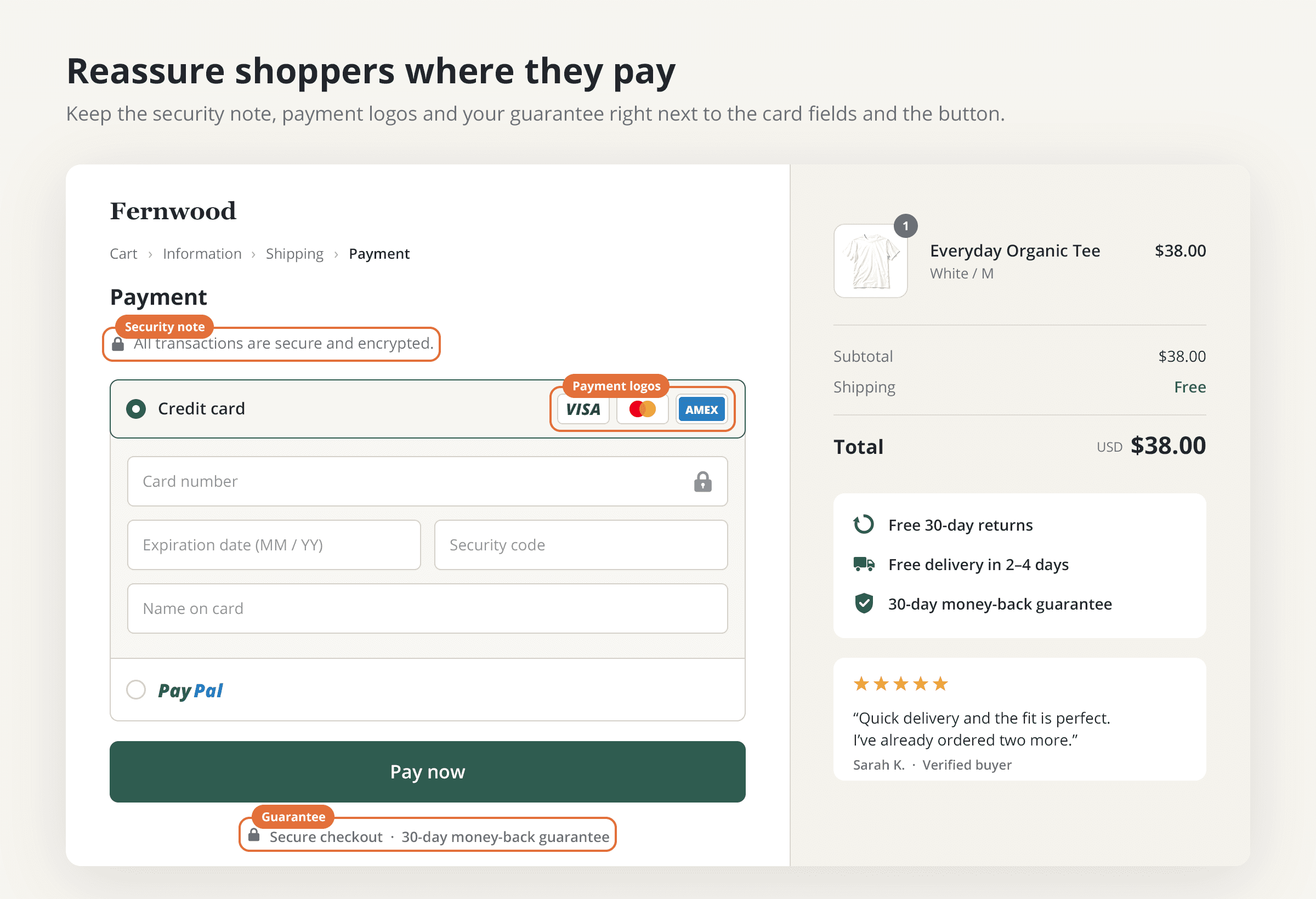
At checkout the main worry is payment security. Place a secure checkout note and payment logos right next to the card fields and the pay button. Baymard’s research also suggests that shoppers judge security by how the page looks, so a clean, visually contained payment section can feel safer than a seal on its own.
In the header, hero or footer
A slim announcement bar or a strip under the hero section is a good place for store-wide promises such as free delivery over a set amount or free returns. The footer is the usual home for payment logos. These placements help, but they don’t replace badges at the point of purchase, because most people won’t remember a footer badge by the time they reach the button.
Trust badge best practices
1. Answer real questions, not imagined ones
Start with what your shoppers actually worry about. Look at customer service emails, reviews and questions in your chats. If people often ask about sizing or delivery times, a badge about that will help more than another security seal.
2. Use fewer, clearer badges
Two to four badges in one place is usually enough. A wall of ten seals looks desperate and nobody reads it. Each badge should have one short label that makes sense on its own.

3. Be specific
Free 30-day returns says far more than Hassle-free returns. Ships within 24 hours beats Fast shipping. Specific badges feel like promises, vague ones feel like decoration.
4. Make them match your design
Badges in clashing colours and mixed styles look pasted in, and that can make a store feel less trustworthy, not more. Use one consistent icon style and colours that fit your brand. Payment logos can stay in their own style, but keep them small.
5. Only show what’s true
Never use a seal you don’t have or a guarantee you don’t honour. Fake trust badges are easy to spot, damage your reputation and can mislead customers. If a badge links to a verification page, check that the link works.
6. Check them on mobile
On a phone, badges often wrap onto several lines or slip far below the button. Check that the row near your add to cart button stays compact and readable on a small screen, and that the icons are big enough to recognise.
7. Test the impact
Whether a badge helps depends on your store and your shoppers. If you have enough traffic, test changes to the badges near your add to cart button, and use the A/B test calculator to check how long the test needs to run.
How to add trust badges on Shopify
You don’t always need an app. Many Shopify themes, including Dawn, offer an option to show payment icons in the footer and an icon with text block on the product page, which works well for a row of shipping, returns and security badges right below the add to cart button. Check your theme editor before installing anything.
Shopify’s own checkout already shows that payments are secure, and it displays the payment methods you have enabled, so you rarely need extra seals there. If you do use a trust badge app, choose one that loads quickly and lets you match your store’s style, and remove apps you no longer use, since each one can add weight to your pages.
Common trust badge mistakes
- A long row of seals that nobody recognises.
- Badges hidden in the footer instead of near the add to cart button.
- Vague labels such as 100% quality or Best service.
- Clashing colours and mixed icon styles that look pasted in.
- Payment logos for methods the store doesn’t accept.
- Seals or guarantees the store hasn’t earned or won’t honour.
- Badges that wrap into a messy block on mobile.
Trust badge checklist
Use this list to review your product, cart and checkout pages:
- Two to four clear badges sit right below the add to cart button.
- Each badge answers a real shopper question, such as returns or delivery.
- Labels are specific, for example Free 30-day returns.
- Shipping and returns promises are repeated in the cart.
- A secure checkout note sits next to the payment fields.
- Payment logos only show methods you accept.
- Every seal and guarantee is real and current.
- Badges match your design and stay compact on mobile.
If you’d like an expert to check how trustworthy your store feels to a first-time visitor, a CRO audit covers trust signals along with the rest of your store, with a video walkthrough, a written report and a prioritised list of what to fix first.
FAQ
Frequently asked questions
What are trust badges?
Trust badges are icons, seals or short labels that reassure shoppers a store is safe and reliable. They include payment logos, secure checkout badges, money-back guarantees, shipping and returns promises and third-party seals such as review ratings.
Do trust badges increase conversions?
They can, when they answer real worries at the point of purchase, for example free returns next to the add to cart button or a secure checkout note next to the payment fields. The effect varies by store, so test changes where you have enough traffic.
Where should I put trust badges on my website?
The most important spot is directly below the add to cart button on product pages. Repeat key promises in the cart, place a secure checkout note and payment logos near the payment fields, and use the header or footer for store-wide promises.
How many trust badges should I use?
Usually two to four in one place. Too many badges look cluttered and get ignored. Choose the ones that answer the questions your shoppers ask most.
What is the difference between trust badges and trust seals?
The terms are often used interchangeably. Trust seals usually refers to badges from third parties, such as security or review companies, while trust badges also includes your own promises, such as free returns or a guarantee.
How do I add trust badges on Shopify?
Many Shopify themes have built-in options: payment icons in the footer and an icon with text block on the product page for shipping, returns and security badges. Use an app only if your theme can’t do what you need, and keep an eye on page speed.
CRO audit
Find out what’s costing your store sales
A full review of your store with a 40+ minute video walkthrough, a written report and a prioritised list of fixes, delivered within 5 business days.
Every audit is done personally by Bryan.
Start the Full Audit
Want an expert to check your store?
Guides like this cover what works on most stores. A CRO audit applies it to yours: a video walkthrough of your store, a written CRO report and a prioritised list of what to fix first.